

Say Hello to Effortless AI App Building
Imagine you have your App idea written in plain English, and you click “ENTER” and boom, the App idea comes to life- no coding, no fuss, just a magic ENTER button. With Google Firebase Studio, that magic can be done. This next-gen Cloud-based platform is tailored to help developers and even non-coders build and deploy AI-powered applications with ease.
Firebase Studio blends the power of AI, automation, and the trusted infrastructure of Google Firebase to help you design and deploy your app ideas in just a few clicks.
In this blog, we’ll explore what Firebase Studio is, how it works, its AI capabilities, and a hands-on tutorial to build your first app- no intimidating jargon, just simple steps.
Unboxing the Google Firebase Studio
Think of Google Firebase Studio as your full-stack web developer employee who can build and deploy a full end-to-end working Application in minutes just by telling what you need. It’s a Google Browser-Based IDE(Integrated Development Environment) whose sole purpose is to create full-stack applications with speed and the touch of AI(Gemini 2.5).
So what’s in the box?
- The Coding Environment: So, if you’ve written code before, working with Firebase will feel similar to writing code in Visual Studio Code.
- The Backend muscle of Firebase: It can handle authentication, database, cloud functions, and hosting without getting tired.
- Gemini-powered AI Assistant: Firebase Studio has the most advanced multimodal thinking capability AI at the time to support code generation and text understanding.
- Live Preview and click deploys: You can see the live application preview in the Firebase Studio itself after the code generation is completed. And also, if you liked the preview, you can directly deploy the application.
If you want to read more, check out the Gemini 2.5’s true capabilities!
Inside the Toolbox: Key Features of Google Firebase Studio
Firebase Studio isn’t just a code editor- it’s your AI-assisted command centre for building, testing and deploying a fully functional full-stack application. Let’s see what are its key features:
- AI-Powered App Creation
- Say goodbye to typing thousands of lines of code one by one and say hello to a natural language prompts code generator. You just need to describe your app idea in plain English, and Firebase’s Gemini 2.5-powered AI will do the rest.
- If you have an image or visualisation of your idea, just upload it to Firebase Studio to guide the AI on how you want your Application to look.
- Cloud IDE
- Firebase Studio provides a working environment similar to Visual Studio Code, eliminating the need for installation or setup, allowing everyone to quickly familiarise themselves with the interface.
- Full-Stack Support
- React, Next.js, or Vue, Firebase has got it all. Firebase supports both Frontend and Backend coding and debugging.
- With services like Cloud Functions, Firestore, or Authentication, Firebase can seamlessly integrate backend services.
- Template Gallery
- Not sure where to start? No problem. Firebase AI can choose pre-built templates and starter kits from the growing libraries. Whether it is a chat app, a to-do list, or an e-commerce site, Firebase can give you a quick start.
- Instant Preview and Deployment
- With the help of Firebase Studio, you can instantly bring your idea to life, see the errors, and fix them instantly. After correcting all the mistakes and doing the key fixes, you can deploy your application online with just one click. Yes, building and deploying an application using Firebase Studio is easy.
Beginner-Friendly Tutorial: Build a Web App Using Firebase
Let’s create a simple web app using Firebase Studio.
- STEP 1: Open and Sign up for Firebase Studio
- Navigate to Google Firebase Studio, accept the terms and conditions, and sign up through your Google account.
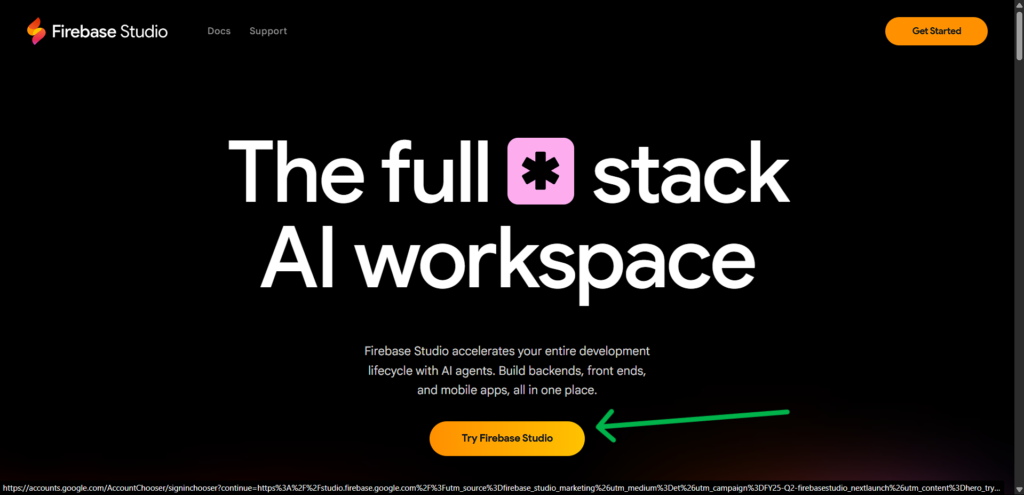
- Step 2: Start a New Project
- Click on “Prototype an app with AI”.
- In the prompt field, describe your app and click “Prototype with AI”.. For example:
"A simple contact form that saves user name and email to Firebase Realtime Database."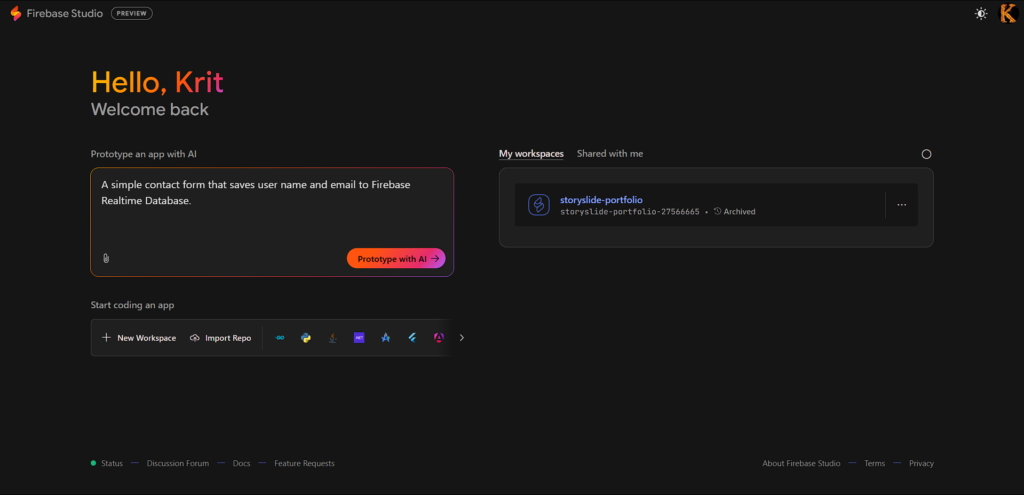
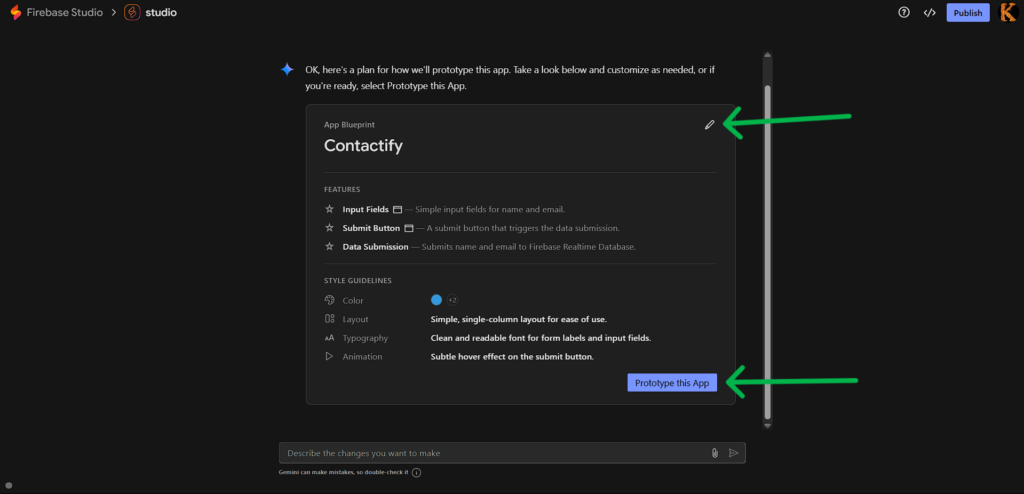
- Step 3: Review and Customise
- Firebase Studio will generate a functional web app based on your prompt.
- Use the integrated Gemini AI assistant to make adjustments by typing natural language commands.
- You can also manually edit the code using the built-in code editor.
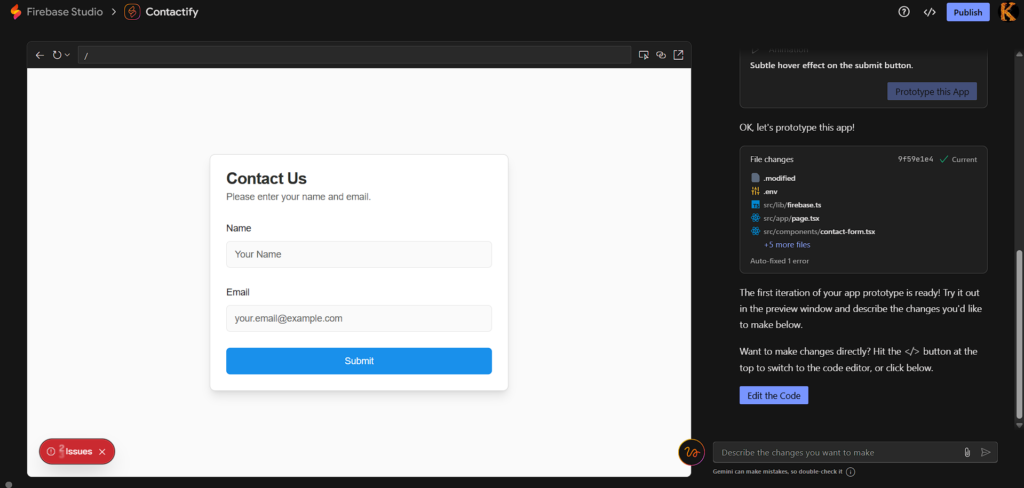
- Step 4: Test Your App
- Use the Preview feature to test your app in real-time.
- Make any necessary changes and re-test as needed.
- Step 5: Preview Your APP
- Use the live emulator to:
- Save your Contact details
- Test the database
- Use the live emulator to:
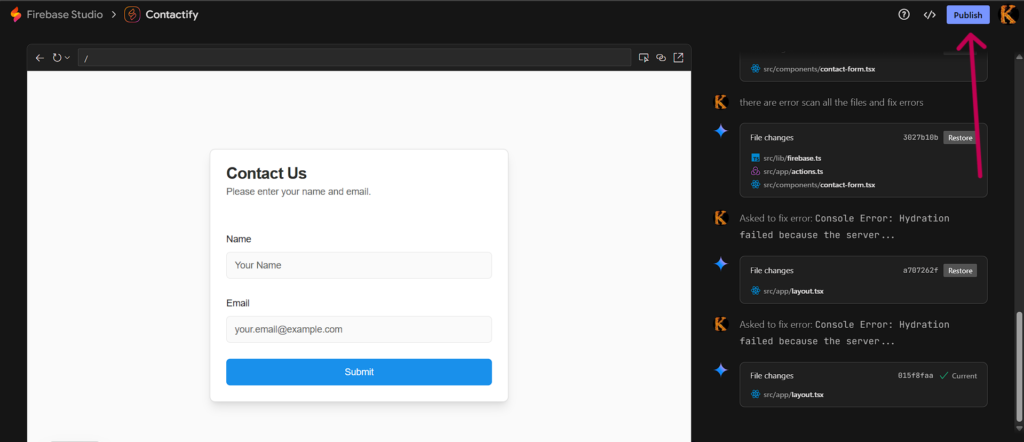
- Step 6: Deploy Your App.
- Click on “Publish”-> Your app goes live via Firebase Hosting-> Share your unique Link.
If you want to see a video tutorial, check it out:
Benefits of Using Google Firebase Studio
There are quite a lot of benefits of using Google Firebase Studio, but the key advantages of using it are:
- No set-up is needed for any application, no need to download any extension pack or all the fuss required to write a Hello World program.
- AI-accelerated workflow, which increases efficiency and productivity. It also accelerated ideation and development.
- Easy prototyping and iteration make it easier to complete any difficult project.
- Firebase infrastructure scales well with the backend service itself very seamlessly.
- Suitable for beginners and can be useful for professionals to get a base start for any project.
These things make Firebase Studio such an extraordinary assistant for developers.
What’s the Future App Dev?
We’re stepping into the future, where building an application feels less like coding and more like typing English words.
With platforms like Firebase Studio, the traditional development workflows are getting a serious upgrade:
- Apps can be built by just describing them detailedly, not painstakingly coding every component.
- Developers can do browser-based collaboration. They can work remotely from anywhere, seamless workflow can be achieved easily.
- AI support is baked in, from writing code to fixing bugs, from developing the UI to deploying the whole app. Everything can be done while taking a sip of the chai.
And this is only the beginning. As AI continues to evolve, an increasing number of tools will emerge, leading to many possibilities.
So, about the future of App dev? It’s voice-assisted, AI-accelerated and radically more accessible. It is no longer Code writing, optimising, or making the UI better.
You + Firebase Studio = Next-Level Apps
Whether you’re a seasoned developer looking to build faster or a complete beginner with a big idea and zero coding skills, using Firebase Studio would be a great idea for your project.
It gives you the power of AI, the muscles of Firebase-backed services, and the ease of previewing your application getting built in front of your eyes. No more need to set up an environment, no need for extensive knowledge of coding, and no need for decision fatigue over frameworks or tooling. Just a clean, collaborative space where creation flows naturally.
And while technologies are still evolving, one thing is clear: this is more than a dev tool— it’s a creative companion. One that helps you think, build, and deploy smarter.
So, how are you going to use Firebase Studio?